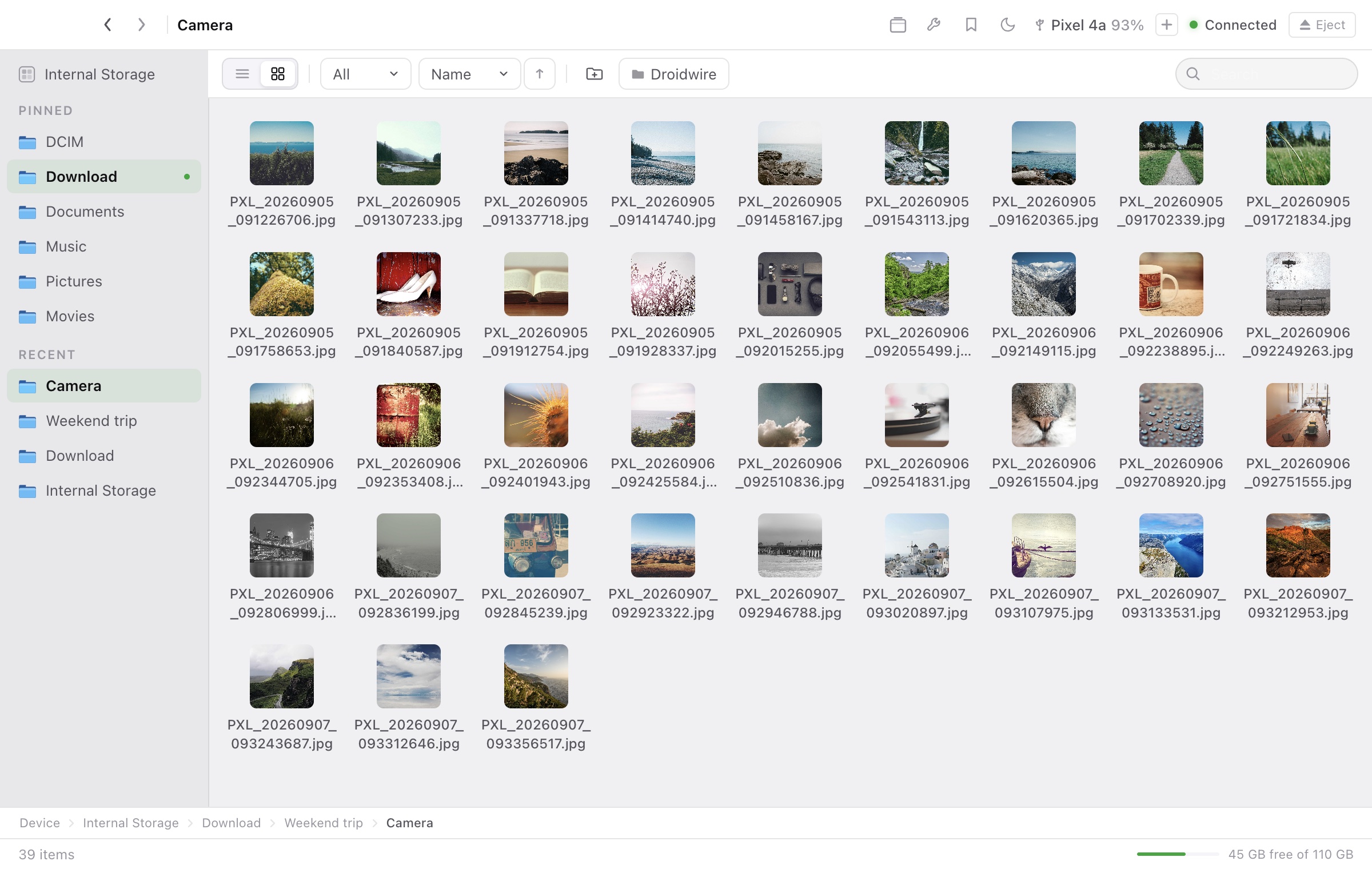
Browse like Finder.
List or grid, with real thumbnails for images, PDFs and video. Tabs, bookmarks, sorting, filters and search.
Plug in your phone, browse it like a folder and move what you need at full USB speed. Free, with no account, no sign-up and no data collected.
Apple Silicon · macOS 12+ · Unsigned build, see the install guide
Plug in your Android phone with a USB cable, or pair over Wi-Fi.
A working replica of the app with sample files and stock photos, playing on a loop. Click to take over. Nothing here touches a real phone.
Pick USB for everything, Wi-Fi to cut the cable, and note that MTP is deferred and not part of this beta.
Real screens from the real app. Nothing mocked up.
List or grid, with real thumbnails for images, PDFs and video. Tabs, bookmarks, sorting, filters and search.
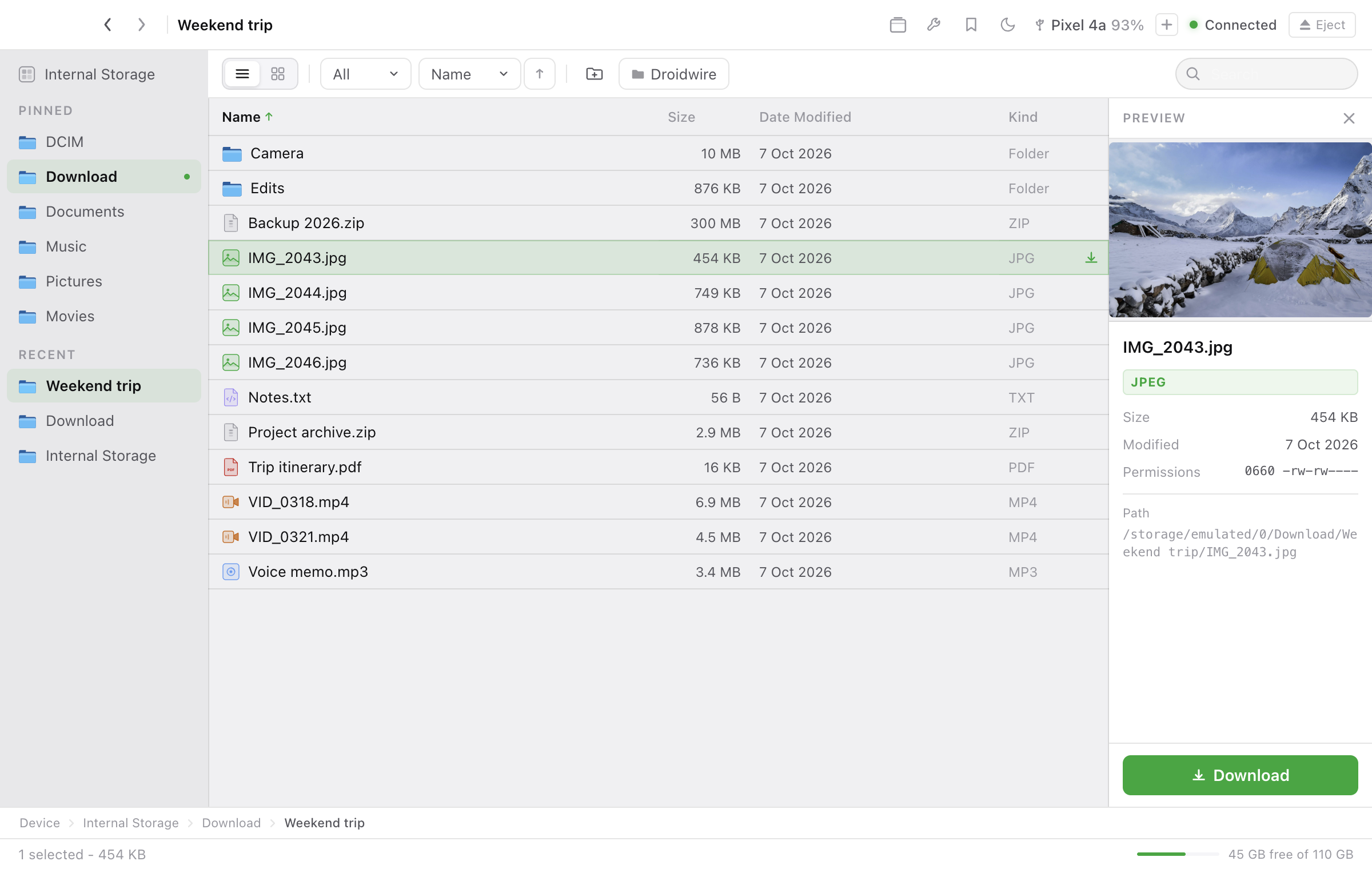
See a photo, PDF page or text file and its details without downloading it first.
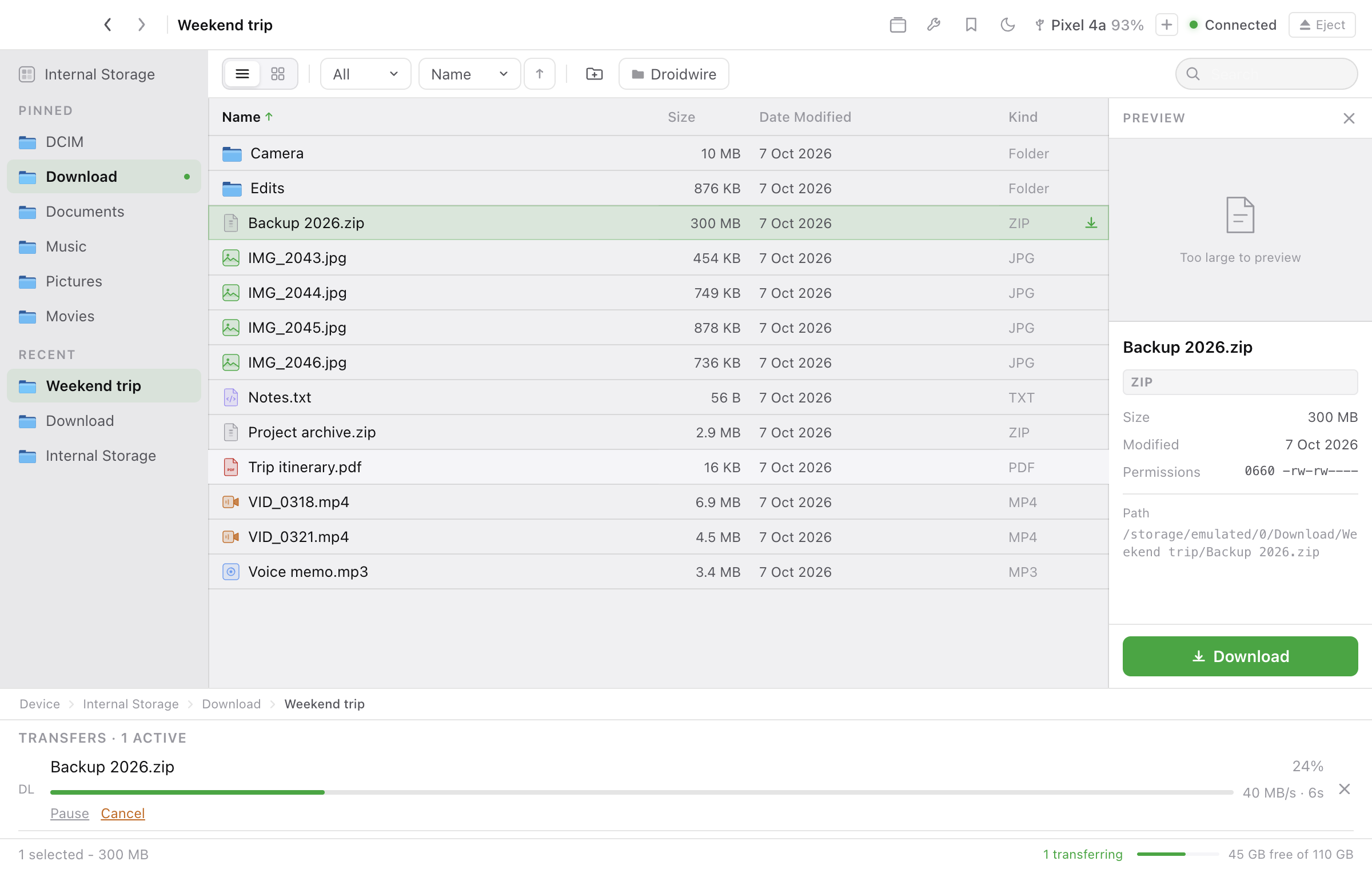
Per-file progress, live speed and time left. Pause, resume, reorder or cancel from the queue, and get a notification when it is done.
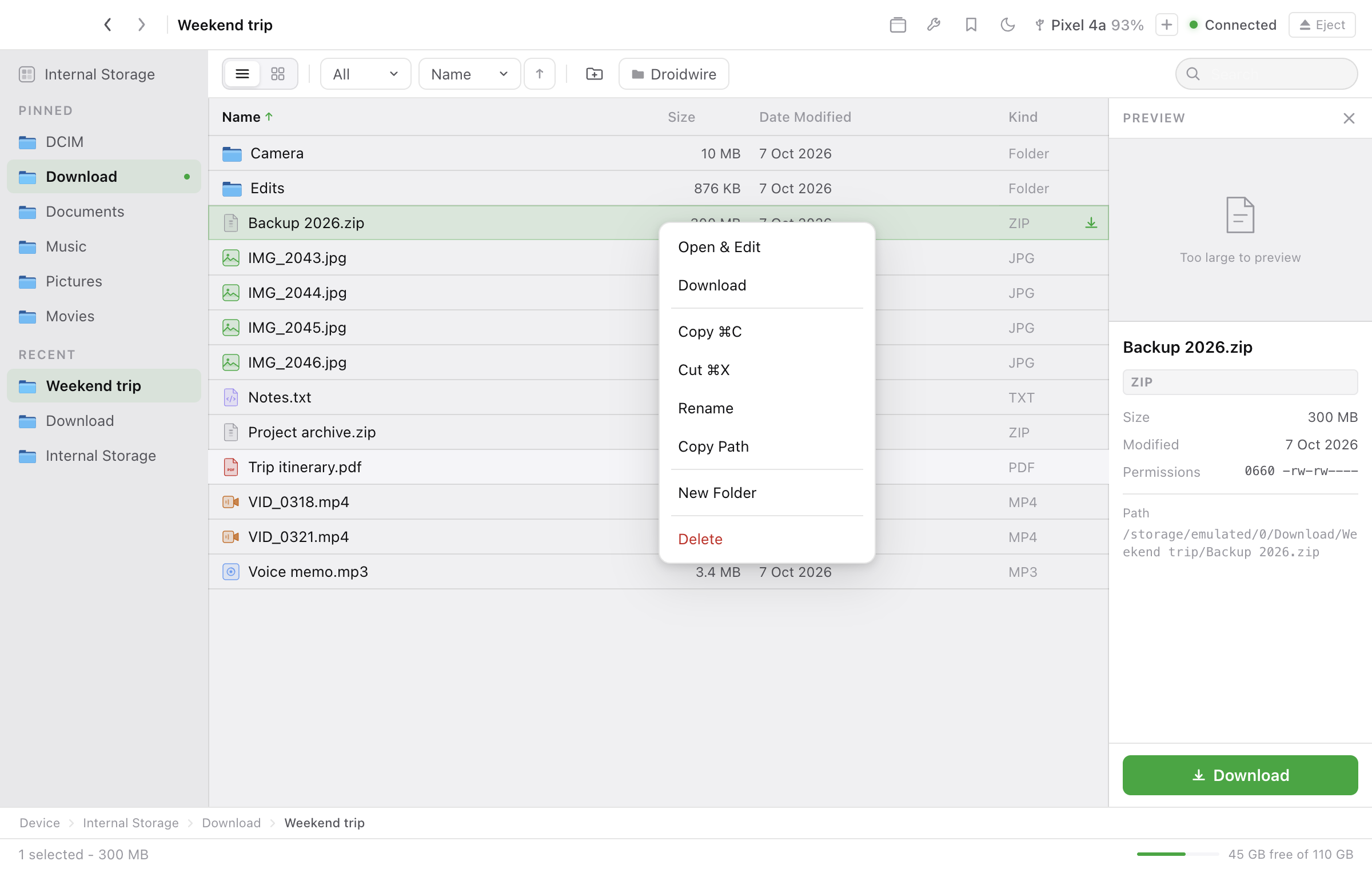
Download, rename, copy, cut and delete. Deletes always ask first.
Open a phone file in its Mac app. Save, and Droidwire sends the change back.
Drop a file on the menu bar to send it to the phone's Download folder. Switch phones from the titlebar.
Droidwire never asks who you are. Your files travel directly over USB or your local Wi-Fi, and nothing about you or your phone is collected, stored or sent anywhere. This website sets no cookies and loads nothing from third parties.
Read the privacy details →Droidwire is MIT licensed and developed in the open. Audit it, fork it, send a fix.
git clone https://github.com/ajithonmain/droidwire.git
cd droidwire
node scripts/bootstrap.mjs
npm run verify
npm run desktop:dev
Steps 3 to 5 are needed once, because these builds are not signed or notarized with an Apple certificate yet.
Grab Droidwire-1.4.1-arm64.dmg from the download button (a beta prerelease; the unsigned app needs the quarantine step below). By installing, you accept the terms of use. Short version: it is free, provided as-is, and you should keep backups of anything irreplaceable.
Open the downloaded .dmg and drag the Droidwire icon onto the Applications folder. You can then eject the .dmg.
Open Droidwire from Applications. macOS shows an alert, usually "Droidwire is damaged and can't be opened". The app is not damaged; macOS says this about any app that isn't signed with an Apple certificate. Click Cancel (do not click "Move to Trash") and go to the next step.
Open Terminal (press Cmd + Space, type "Terminal", press Enter). Paste this command and press Enter:
xattr -dr com.apple.quarantine /Applications/Droidwire.appWhat it does: macOS tags every downloaded file with a "quarantine" flag, and that flag is what triggers the "damaged" alert on unsigned apps. This command removes the flag from the Droidwire app only. It changes nothing else on your Mac and prints nothing when it succeeds.
Open Droidwire again from Applications (or Launchpad or Spotlight). It now opens normally and stays that way. You never repeat steps 3 to 5.
Plug in your phone (or use Wi-Fi) and the built-in setup walks you through connecting it. There is nothing to sign up for.
Yes. It is free to download and use, with no paid tier, no ads and no account. The source code is released under the MIT License.
No. There is no account, no sign-up and no email prompt. The app collects no personal data, no analytics and no crash reports. The only request it makes on its own is an optional check of GitHub for a newer version, which you can switch off.
No. Droidwire uses Android's own built-in protocols: USB debugging or Wireless debugging. Nothing is installed on the phone, ever.
Builds are not signed and notarized with an Apple Developer certificate yet, and macOS reacts that way to any unsigned downloaded app. The install guide shows the one-time fix. Prefer not to run an unsigned app? Build it from source and read the code first.
The code is public and MIT licensed, so you can read it or build it yourself. Files only move between your devices, and nothing is sent to a server. Note that USB debugging gives your Mac access to the phone, so turn it off when you do not need it.
Apple Silicon Macs on macOS 12 Monterey or later. Intel Macs are not supported. Android 8.0 or later for USB mode, Android 11 or later for Wi-Fi mode. Hardware testing is limited to one phone and one Mac (see the compatibility table below), so reports of what works are welcome.
USB and Wi-Fi both use ADB and unlock every feature, including device tools and APK handling. USB needs a cable; Wi-Fi needs Android 11 or later and a one-time pairing. MTP, a simpler mode that needs no USB debugging, is deferred: it is not part of this beta and is not in the app.
No, and none is planned. Droidwire is a Mac app for Android phones.
Open an issue on GitHub, or read the contributing guide to send a fix.
What you need on each side of the cable.
| Mac | Apple Silicon (M1 or newer), macOS 12 Monterey or later. Intel Macs are not supported |
| Android | Android 8.0+. USB mode needs USB Debugging, Wi-Fi mode needs Wireless debugging (Android 11+). Droidwire walks you through each |
| Nothing else to install | From version 1.4.0, adb and video thumbnails are built into the app. No Homebrew, Android SDK or extra downloads. Earlier builds needed adb installed separately |
| Phone-side app | None. Nothing to install on the phone, ever |
| Cable | Any USB data cable (or Wi-Fi with wireless ADB on Android 11+) |
| Tested phones | Verified by the maintainer on one setup only: a Pixel 4a running Android 13, with an Apple Silicon Mac on macOS 26. Other phones, other Android versions, older macOS versions and Intel Macs are untested, and the app is unsigned and not notarized. The screenshots on this page were taken on the Pixel 4a. Reports of what works are welcome |
| Price | Free. No paid tier, no ads, no account |
Files move directly between your devices. No account is needed and no personal data is collected.
| Where files go | Directly between your Mac and your phone over USB or your local Wi-Fi network. No server, no cloud, no third party ever sees them |
| Accounts and sign-up | None. No account, login, password or email, and the app never asks for any personal information. (Earlier beta builds up to 1.2.1 asked for an email address once; that was removed in 1.3.0.) |
| Data collected | None. No analytics, no tracking, no telemetry, no crash reporting |
| Network use | No file data ever leaves the cable or Wi-Fi link to your phone. The app makes exactly one request on its own: on launch it asks GitHub's public API for the list of releases (first page, prereleases included) so it can tell you when a newer version exists. It sends no identifiers (GitHub sees your IP address, like any web request) and installs nothing. Turn it off under Droidwire menu > Check for Updates Automatically, or check by hand with Check for Updates. That is the full list |
| This website | No cookies, no analytics, no tracking scripts, no third-party requests. Fonts and images are served from the site itself |
| Your phone | Nothing is installed on it. Droidwire talks over Android's own built-in protocol (ADB). Revoke access anytime: turn off USB Debugging or unplug the cable |
| Deleting files | Every delete asks for confirmation first. Nothing is removed silently |
| Logs | Kept only on your Mac, for debugging. Shared only if you attach them to a bug report yourself |
| Why the macOS warning? | Builds are not signed and notarized with an Apple Developer certificate yet. The "damaged" alert is macOS's blanket response to any unsigned app, not a judgment about this one. Droidwire never removes the flag for you |
Last updated 7 October 2026. These terms replace the earlier beta terms.
Droidwire is free to download and use, for personal and commercial purposes. There is no fee, no paid tier, no advertising, and no account, registration or personal information is required.
Droidwire's source code is released under the MIT License, which lets you use, copy, modify, merge, publish, distribute and sell copies, provided the copyright and license notice are kept. Bundled third-party components keep their own licenses, listed in the open-source licenses section below and shipped inside the app.
Droidwire is provided "as is", without warranty of any kind, express or implied, including fitness for a particular purpose and non-infringement. You use it at your own risk. Keep backups of anything irreplaceable before large transfers or deletes.
To the fullest extent permitted by law, the author and contributors are not liable for any claim, damages or loss, including loss or corruption of data, arising from the use of Droidwire or from this website.
Droidwire collects no personal data and sends none to the author or to any third party. Files move only between your Mac and your phone. See the privacy section for the full list of network requests.
Only connect devices you own or are authorized to access, and follow the laws that apply to you. USB debugging and Wireless debugging give your Mac access to the phone, so turn them off when you do not need them.
Release builds are not yet signed or notarized by Apple. Opening one means you choose to clear macOS's quarantine flag yourself. If you prefer not to, build from source.
Android is a trademark of Google LLC. Apple, Mac and macOS are trademarks of Apple Inc. Droidwire is an independent project and is not affiliated with, endorsed by or sponsored by Google or Apple. Photos in the screenshots on this page are stock photos from Unsplash.
These terms may change as Droidwire changes. The current version is always on this page, and past versions are in the repository history. Continuing to use Droidwire after a change means you accept the updated terms.
Questions or concerns: open an issue on GitHub.
What is inside Droidwire, and under which licenses.
| Droidwire | © 2026 Ajith M Jose. MIT License |
| Open source inside | Electron (MIT), Android Debug Bridge / adb (Apache-2.0, built from AOSP source), libusb (LGPL-2.1), React (MIT), qrcode (MIT). Full notices ship in the app: Droidwire menu > Licenses |
| LGPL note | libusb is dynamically linked; you may substitute your own build of this library per the LGPL-2.1 |
| Android robot | Reproduced or modified from work created and shared by Google and used according to terms described in the Creative Commons 3.0 Attribution License |
| This website | Set in Geist and Geist Mono (SIL Open Font License 1.1). Stock photos in the screenshots are from Unsplash |
Free. No sign-up. No data collected.